
Quick answer
If a song is split too often, increase “Minimum Silence” or merge neighboring segments. If songs remain joined, adjust the preset or add manual cuts.
Step by step
3 stepsListen around one wrong boundary
Check whether one song was split or two songs were left joined. Segmentation cannot restore audio missing from the source.
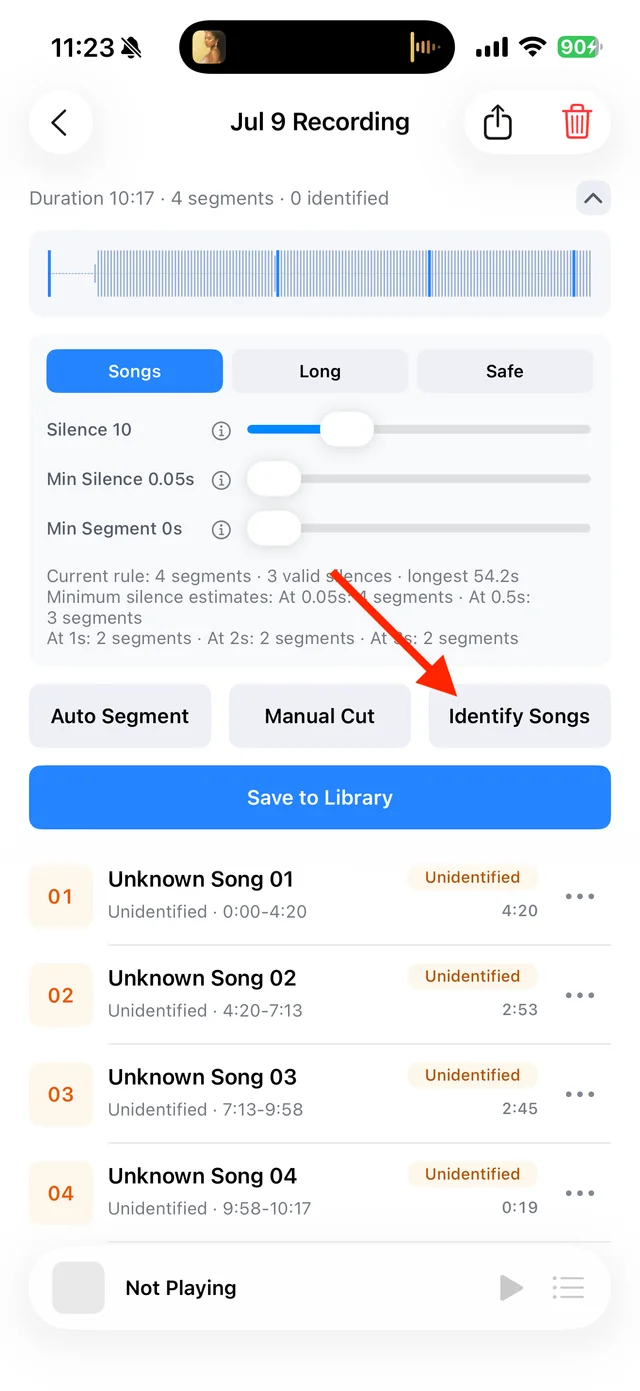
Split, identify, and save audio on the recording page Reduce unnecessary cuts
Try the “Safe” preset or increase “Minimum Silence”. For just a few wrong cuts, merge neighboring segments from their menus.
Add missing boundaries
For continuous audio without quiet gaps, use “Manual Cut” at song transitions. Check intros and endings before saving.

Select the tracks you want to keep and save them

Common questions
Does “Minimum Segment” make every segment the same length?
No. It controls short segments; it does not choose the content boundaries for you.
Can I adjust a track already saved to the Library?
Yes. Open “Details and Source” → “Resegment and Identify”. Keep the original while checking the new segments.